 Intro to C++
The world runs on C++. Operating systems, web browsers, video games, heck even Python is written in C++. Unfortunately, C++ isn’t exactly known for being easy to learn, but if you already know another language like Java or Python, it will be easier to pick up. This little tutorial can’t teach you everything there is to know, but we’ll cover some of the basics.
If you want to follow along, you can set up a C/C++ compiler in VS Code with this tutorial: https://code.visualstudio.com/docs/languages/cpp
Plain Old C
Before C++ there was C. C introduced the syntax that many modern programming languages are based on. There’s still quite a lot of C code out there, so it’s likely that you’ll encounter some. Luckily, C++ is a “superset” of C, meaning that *almost* all C code is also valid C++ code.
Unlike some other languages, C/C++ don’t care what file extensions you use, so
file extensions are more convention than standard. C source code is typically
denoted with .c and C++ source code is typically denoted with .cpp.
For these examples, assume we have a file main.c.
The Compiler
The main difference between C++ and Python is that C++ is a compiled language. That means that a program called a compiler must translate your code into machine instructions specific to your system before your computer can run it. Python, on the other hand, is an interpreted language, meaning a program called an interpreter reads your code line by line in real time. This makes C++ a whole lot faster than Python since there isn’t a whole extra program running between your code and your machine. The downside is that you must compile C++ before you can run it, while Python runs immediately.
Another difference is that Python is a “scripting” language, so when your
program runs, the Python interpreter begins at the top of the file and executes
code until it reaches the end. In C++, code will begin executing in the
main() function (wherever in your program that may be).
Functions
All C programs need a place to start and that place is the main() function.
- Function (also called a Method or a Procedure)
A named segment of code that a program can jump to and execute before returning to where it left off.
int main() {
    return 0;
}
This program isn’t very interesting because it doesn’t do anything at all.
int main() means “a function named main that returns an int”.
Sure enough, main() returns 0 which is an integer. Since we are
returning from the main() function, the program simply ends.
By convention, 0 means “success” and anything more than 0 indicates “error”.
For your first program, it’s a long-held tradition to write the classic “Hello World!” program. Printing to the console is actually a lot of work. It requires interacting with the kernel and its device drivers. Luckily for us, C comes with a standard library that does all the heavy lifting for us.
#include <stdio.h>

int main() {
    printf("Hello, World!");
    return 0;
}
>>> Hello, World!
Here, we use #include to paste all the code from the file stdio.h at
the top of our program. That code contains a function called printf() which
accepts a string of text as an argument.
- Argument (also called a parameter)
A value passed into a function to change what it does.
Now, let’s get a little funky by defining some functions of our own:
#include <stdio.h>

int add(int a, int b) {
    return a + b;
}

void printNumber(int n) {
    printf("%d", n);
}

int main() {
    printNumber(add(10, -2));
    return 0;
}
>>> 8
We’ve defined two functions add(), which accepts two integers and returns
an integer, and printNumber(), which accepts an integer and returns…
nothing. printNumber()’s return type is void. Note that you can also
chain functions together. The result of add() was used as the input for
printNumber().
You can only use a function later in the file than where it was declared. To get around this, we can use a “forward declaration”:
#include <stdio.h>

// Declared, but not defined yet
int add(int a, int b);
void printNumber(int n);

int main() {
    // The compiler knows printNumber() and add() *will* exist
    printNumber(add(10, -2));
    return 0;
}

// Definitions
void printNumber(int n) {
    printf("%d", n);
}

int add(int a, int b) {
    return a + b;
}
>>> 8
Note
It is standard to put all of your forward declarations in a separate file called a header. Header files are a huge part of C and C++, but we’ll cover them in a later section.
Function Overloading
In C++ but not in C, you can name multiple functions the same thing and let the compiler decide which one needs to be called based on the types you pass to it:
#include <stdio.h>

int add(int a, int b) {
    return a + b;
}
float add(float a, float b) {
    return a + b;
}

int main() {
    int i = add(1, 2); // int add(int, int) is called
    float f = add(1.0f, 2.0f); // float add(float, float) is called
    printf("Integer: %d, Float: %f", i, f);
    return 0;
}
>>> Integer: 3, Float: 3.000000
In C, all functions must have unique names, so you would have to name the two
versions of add() differently. The convention is to append an extra letter:
#include <stdio.h>

int addi(int a, int b) {
    return a + b;
}
float addf(float a, float b) {
    return a + b;
}

int main() {
    int i = addi(1, 2);
    float f = addf(1.0f, 2.0f);
    printf("Integer: %d, Float: %f", i, f);
    return 0;
}
Variables
That nested function call we used in our previous example was pretty cool, but it’s a little hard to read. Let’s tweak it to use a variables.
- Variable
A name given to a value to save it for later.
#include <stdio.h>

int add(int a, int b) {
    // Add integers a and b and store the result
    int sum = a + b;
    // Return the sum
    return sum;
}

void printNumber(int n) {
    printf("%d", n);
}

int main() {
    // Declare integer variables x and y
    int x = 10, y = -2;
    // Add x and y together and store the result
    int sum = add(x, y);
    // Print the result
    printNumber(sum);
    return 0;
}
>>> 8
Now that our program has gotten more complex, I’ve added some comments. This is way more pedantic than you need to be, but comments can be extremely helpful for others looking at your code in the future.
- Comment
A note left by the programmer that is ignored by the compiler.
Scopes
All variables must have a unique name. However, you might have noticed that
sum is declared twice: once in main() and again in add()! This is
ok because the two variables are in different scopes.
- Scope
The region of a program where a variable is accessible.
In C, a new scope is created between every pair of curly braces {}.
// Global scope
int sum;

int add(int a, int b) { // Beginning of add()'s scope
    // This sum is different from the global sum variable
    int sum = a + b;

    { // Anonymous, unnamed scope
        // This sum variable is different from the other two
        int sum = 21;
    } // End anonymous scope

    // This sum is still a + b because the anonymous sum variable is in a
    // lower scope and thus inaccessible, and the global sum variable is
    // "masked" by the sum variable in the current scope
    return sum;
} // End of add()'s scope

// Back in global scope
Note that the global sum variable isn’t assigned anything with the =
operator. So what is it’s value? It’s uninitialized, meaning it contains
whatever garbage memory was left over from the previous program that was
running in the same memory area. It could be 420, or it could be -100000000.
Statistically, it would probably be 0. If we accessed the global sum, we
would get “undefined behavior”.
- Undefined Behavior
When something illegal happens so the output of your program is unpredictable.
Static Variables
The static keyword is confusing because it can mean multiple different
things depending on the context. If it’s in a function body, it allows a
variable to persist between function calls.
#include <stdio.h>

int callMe(int printNum) {
    static int timesCalled = 0; // This is run only the first time
    timesCalled = timesCalled + 1; // Increase timesCalled variable by 1
    printf("Number: %d, Times Called: %d\n", printNum, timesCalled);
}

int main() {
    callMe(420);
    callMe(69);
    callMe(-1000);
    // printf("Times Called: %d", timesCalled); ERROR: timesCalled only exists in callMe()
    return 0;
}
>>> Number: 420, Times Called: 1
>>> Number: 69, Times Called: 2
>>> Number: -1000, Times Called: 3
Types
In programming, all numbers are represented in binary – 0’s and 1’s. A single 0 or 1 is called a “bit”. Memory is divided into groups of 8 bits called a “byte”. Every byte in memory has a unique address. Larger numbers require more than one byte to be represented.
Here are the basic types in C:
Type |
Bytes |
Description |
Example |
|---|---|---|---|
bool [1] |
1 |
true or false |
|
char |
1 |
character (-128 to 127) |
|
short |
2 |
integer -215 to 215-1 |
|
int |
4 [2] |
integer |
|
long |
4 |
integer -231 to 231-1 |
|
long long |
8 |
integer -263 to 263-1 |
|
float |
4 |
single-precision floating point number |
|
double |
8 |
double-precision floating point number |
|
For char, short, int, long, and long long, you can force
them to be positive with the unsigned keyword. Example:
unsigned int ui = 21U;
unsigned long ul = 21UL;
Note the extra letters added to the end of the numbers. These specify the type of number that C should assign. C also allows you to assign number in different numeric bases:
Prefix |
Base |
Example |
|---|---|---|
(none) |
Base 10 |
|
0b |
Binary (Base 2) |
|
0o |
Octal (Base 8) |
|
0x |
Hexidecimal (Base 16) |
|
All variables can also be declared as const which prevents them from being
accidentally changed.
int main() {
    float f1 = 3.64f;
    const float f2 = 6.78f;
    f1 = 4.64f; // OK
    f2 = f1; // ERROR: assigning to const
    return 0;
}
C is a statically typed language, meaning that the type of every function and variable must be known at compile time. In Python you could do something like this:
# Declare variable x
x = 21
# Declare it again as something else!
x = "cat"
# Crazy array with mixed types!
x = [21, "cat"]
This is a big no-no in C! But why? Why would you want this extra restriction? Well Python has to do a lot behind the scenes to get variables to work like that. In C, variables are allocated next to each other one by one in a region of memory called the “stack” which you can imagine like a stack of books.
int main() {
    int a = 1;
    // Stack: [a:1]

    { // Enter new scope
        int b = 2;
        // Stack: [a:1][b:2]
        int c = 3;
        // Stack: [a:1][b:2][c:3]
        b = a; // Reassign b to another integer
        // Stack: [a:1][b:1][c:3]
    } // Variables b and c are "popped" off the stack

    // Stack: [a:1]
}
Sure, we reassigned b, but we could do that because a already contained
an int. It’s like sliding a new book into the middle of the stack. It needs
to be the exact same size as the old book, or else you’d have to move all the
books above the old book out of the way!
Python gets around this by storing all its variables in a big “heap” of books, which behaves like a bunch of shelves with books scattered around all over. Sure, you can remove and add books of different sizes wherever you please, but the downside is that it takes a longer to find the book you’re looking for because you have to find it by its Dewey Decimal number. This is one of the (many) things that makes C way faster than Python, at the cost of some flexibility.
For more information on the technical details, check out this article about the function call stack.
Exact-Width Integer Types
Because C is so old, it was around for 8-bit machines, 16-bit machines, 32-bit
machines, and nowadays 64-bit machines. Consequently, what was considered a
“normal” size for a regular integer has changed over the years. Depending on
the machine, an int might be 2 bytes or 4 bytes. A long is guaranteed
to be at least 4 bytes, but some systems make it 8 bytes under the hood. This
problem is especially prevalent in the microcontroller wold because
architectures can vary wildly between chips. To make code more portable, C
provides exact-width integer types.
// Contains definitions for exact-width integer types
#include <stdint.h>

int main() {
    int32_t integer = 21; // Always 4 bytes
    uint8_t unsignedChar = 'E'; // Always 1 byte
    return 0;
}
These will appear quite a lot once we get into Arduino code.
You can get the size in bytes of any type with the sizeof operator:
#include <stdint.h>

int main() {
    float f = 4.56f;
    // Evaluate the size of the variable f
    printf("%ld", sizeof(f));
    // Evaluate the size of the type float
    printf("%ld", sizeof(float));
    return 0;
}
>>> 4
>>> 4
Type Casting
Sometimes you need to assign, say, a decimal number to an integer. You can’t change the type of a variable in C, so some extra work has to happen to convert a decimal value into an integer. This is called “casting”:
#include <stdio.h>

double divideByTwo(double d) {
    return d / 2;
}

int printInteger(int n) {
    printf("%d", n);
}

int main() {
    int x = 21;
    double result = divideByTwo(x);
    // printInteger(result); // ERROR
    printInteger((int)result); // We need to cast result to an int
    return 0;
}
>>> 10
Wait… something doesn’t add up here. Why did we have to cast our
double result into an int before giving it to printInteger(), but
we didn’t have to cast our int x into a double before giving it to
divideByTwo()?
C performed an “implicit” cast. In C, types exist in a kind of hierarchy of lower precision to higher precision. It looks something like this:
double |
float |
unsigned long long |
long long |
unsigned long |
long |
unsigned int |
int |
short |
char |
bool |
A variable with any of these types can be assigned with a value of any type
below it on the table without explicitly invoking a cast. However, to assign
a higher type to a lower type would cause a loss of precision, so C makes you
specify the cast. In our example, an int casted automatically into a
double because an int is lower than a double. Hoever, we had to
explicity invoke a cast to assign a double to an int. Yeah, it’s a bit
confusing. When in doubt, it never hurts to specify the cast anyways.
Defining Your Own Types
You can define your own types, too! Let’s create a simple “type alias” with
the typedef keyword:
#include <stdio.h>

// Define MyInteger as an alias of int
typedef int MyInteger;

int main() {
    // Declare a MyInteger
    MyInteger superCoolInteger = 21;
    // Use it like a normal int
    printf("%d", superCoolInteger);

    return 0;
}
>>> 21
Enums (C)
- Enum (short for “Enumeration”)
A type that can be one of a predetermined set of values.
Enums essentially let you give names to integers.
#include <stdio.h>

enum CarType {
    SEDAN,
    TRUCK,
    SUV
};

int main() {
    enum CarType myCarType = TRUCK;
    printf("%d", myCarType);

    return 0;
}
>>> 1
By default, the first value in the CarType list is 0 and each
subsequent enumeration is one value higher.
Structs (C)
- Struct (short for “Structure”)
A type that allows you to group multiple types into a single unit.
Structs are super useful when you need multiple groups of similar variables. Structs can contain multiple different types – even other structs! Each type inside a struct is called a “field”.
#include <stdio.h>

enum CarType {SEDAN, TRUCK, SUV};

struct Car {
    enum CarType type;
    float maxSpeed;
    int numberOfWheels;
};

// Function that accepts a Car as an argument
void printMaxSpeed(struct Car car) {
    // Access field of myCar1 with the "." operator
    printf("%f", car.maxSpeed);
    // This has no effect because car is a copy of myCar1
    car.maxSpeed = 0;
}

int main() {
    // To create a Car, arguments must be in the correct order
    struct Car myCar1 = {TRUCK, 107.5f, 4};
    printMaxSpeed(myCar1);

    // {0} is special and means "enter 0 for all fields"
    struct Car myCar2 = {0};

    // Declare myCar3 with uninitialized values
    struct Car myCar3;
    // Fill in values
    myCar3.type = SEDAN;
    myCar3.maxSpeed = 99.9f;
    myCar3.numberOfWheels = 3;

    return 0;
}
>>> 107.500000
There’s also another type in C called a “union”, but their use is discouraged in C++, so I won’t cover them here, but you can learn about them here if you’re curious.
The Peculiar Typedef Pattern
It’s a bit annoying to have to say struct Car every time we want to make a
car. C keeps separate lists of names for structs, enums, and unions.
Programmers are lazy though, so they got in the habit of using the typedef
keyword to just make Car always mean struct Car.
enum CarType {SEDAN, TRUCK, SUV};
typedef enum CarType CarType;

struct Car {
    CarType type;
    float maxSpeed;
    int numberOfWheels;
};
typedef struct Car Car;

Car myCar; // No need for the extra struct keyword!
It’s very common to do the typedef in one line, though it looks a little
peculiar:
typedef enum CarType { ... } CarType;
typedef struct Car { ... } Car;
Car myCar;
In C++, this typedef thing is done automatically, so you can just:
enum CarType { ... };
struct Car { ... };

Car myCar1; // Automatic typedef thing
struct Car myCar2; // You can still use the old way too
Operators
- Operator
A special symbol that invokes a specific operation.
We’ve already seen an operator: + (addition). Most of them work like they
do in math class and they obey the typical order of operations.
Math Operators
Here are a few C math operators:
Symbol |
Operation |
|---|---|
* |
Multiplication |
/ |
Division |
% |
Modulus (remainder) |
+ |
Addition |
- |
Subtraction |
Note
Unlike Python, all statements bust be executed in the body of a function.
From this point on, there will be many examples that omit int main()
for the sake of brevity.
You can use parentheses () to override order of operations like in normal
math:
5 + 2 * 10 = 25
(5 + 2) * 10 = 70
Here’s an example of adding 1 to a number:
int x = 5;
x = x + 1;
// x is 6
That x = x + 1; is a bit redundant, so C has some more operators to make it
a bit more concise:
int x = 5;
x += 1;
// x is 6
There are also the operators +=, -=, *=, /=, and %= that do
exactly what you’d expect.
For the case of adding 1 and subtracting 1, there are two unary operators:
int x = 5;
x++; // x is now 6
x--; // x is now 5 again
- Unary Operator
Operates on a single operand. (
++for example)- Binary Operator
Operates on two operands. (
+for example)
++ and -- are a bit special because they can be prefix or postfix,
meaning they can go before or after the variable they operate on, respectively.
The usage does change slightly:
int x = 5;
int y = ++x * 4;
// x was incremented before it was used, so y = 6 * 4 which is 24
// and x is now 6

int a = 5;
int b = a++ * 4;
// a was incremented after it was used, so b = 5 * 4 which is 20
// and a is now 6
Where Are My Python Operators?
Those of you coming from Python might be wondering where floor division //
and exponentiation ** went.
For floor division, you have to cast to int after the division:
double floor = (int)(4.4 / 3.3);
For exponentiation, you need to use the C math.h library:
#include <math.h>
double exp = pow(4.0, 3.0);
math.h also has your trig functions, logarithms, absolute value, et cetera.
Logical Operators
Logical operators operate on true and false values. In plain C, there
are no keywords for true and false, so 0 is used for false and
any non-zero value evaluates to true, but usually 1 is true.
true and false are known as “Boolean” values, named after English
mathematician George Boole.
Here are the logical operators:
Symbol |
Operation |
|---|---|
! |
Not |
== |
Equal |
!= |
Not Equal |
> |
Greater Than |
< |
Less Than |
>= |
Greater Than Or Equal To |
<= |
Less Than Or Equal To |
&& |
And (both must be true) |
|| |
Or (either or both) |
! is evaluated first, followed by the comparison operators, followed by
&& and lastly ||.
For example, the following evaluates to true:
!(5 == 6) && 5 != 6 || 5 > 6
Bitwise Operators
Instead of determining if an entire expression is true or false, the
bitwise operators treat each individual bit in an integer as a boolean value.
Here are the bitwise operators:
Symbol |
Operation |
|---|---|
~ |
Logical NOT |
<< |
Shift Left |
>> |
Shift Right |
& |
Logical AND |
^ |
Logical XOR |
| |
Logical OR |
In normal programming, the bitwise operators are seldom used, but in low-level embedded programming, they are used quite often. For instance, microcontrollers often check for which bits are set in specific memory registers to determine how to set up hardware like output pins and timers.
Bitwise operators deserve some extra attention, so we’ll return to them once we get into the nitty-gritty of embedded programming.
Operator Precedence
At this point, we’ve covered most of the operators, so it’s about time we look at the order they are evaluated in. In this table, operators towards the top are evaluated first, and operators on the same level are evaluated left to right.
|
|
|
|
|
|
|
|
|
|
|
|
|
There are a few more operators, but we’ll get to them in Pointers and Friends.
Flow Control
So far, our programs have been pretty linear, but in the real world, your programs will have to change their behavior based on unknown conditions.
Branching
An if statement only executes the code within its scope if an expression
evalutates to true (or any non-zero value).
if (condition) {
    // Execute this code if condition is true
}
Optionally, you can define an else clause:
if (condition) {
    // Execute this code if condition is true
} else {
    // Otherwise, this code will execute
}
If you want to check for yet another condition, but only if the previous check
failed, use else if:
if (condition) {
    // Execute this code if condition is true
} else if (other condition) {
    // Otherwise, if the second condition is true, this code will execute
} else {
    // Otherwise, this code will execute if neither were true
}
The goto statement is a vestige of an older time. It’s a carry over from
when we programmed in assembly. It allows you to jump code execution to some
arbitrary place in your program.
if (condition) {
    // Execute this code if condition is true
    goto mylabel;
    // This code is never executed because of the goto
}
mylabel:
// Execute this code
Edsger Dijkstra, one of the most famous computer scientists of all time,
famously criticised the goto statment as “harmful”, advocating for other
constructs like if. If you can, you should completely avoid the use of
goto.
Here’s one of the dangers that goto introduces:
int x = 9;
goto mylabel;
int y = 10; // ERROR: crossed variable definition
mylabel: printf("%d", x + y);
Nevertheless, goto appears a lot in older code, like in the Linux kernel.
The only reason I am informing you of this evil keyword is so that we can talk
about our next keyword.
Suppose you have the following situation:
enum CarType {SEDAN, TRUCK, SUV};

enum CarType carType = SUV;

if (carType == SEDAN) {
    printf("SEDAN specific code\n");
} else if (carType == TRUCK) {
    printf("TRUCK specific code\n");
} else if (carType == SUV) {
    printf("SUV specific code\n");
} else {
    printf("Unknown car type\n");
}
>>> SUV specific code
You can see how as the number of car types increases, those else if would
start to pile up. Additionally, carType had to be compared to every other
type before finally matching SUV. As more cases are added, the program
would need to perform more and more checks, which is inefficient.
We can fix this with a switch statement.
enum CarType {SEDAN, TRUCK, SUV};

enum CarType carType = SUV;

switch (carType) {
case SEDAN:
    printf("SEDAN specific code\n");
    break;
case TRUCK:
    printf("TRUCK specific code\n");
    break;
case SUV:
    printf("SUV specific code\n");
    break;
default:
    printf("Unknown car type\n");
}
>>> SUV specific code
Under the hood, the switch statement generates a “jump table” that allows
the program to jump to the corresponding case label without necessarily
checking each individual case. This works just like goto, which makes
switch a little weird to work with. The first thing you might have noticed
is the break statements after each case block. Because switch just
tells the program to perform a jump to a label, the program will normally just
keep executing after it jumps. Here’s what would happen if we didn’t have
break:
enum CarType {SEDAN, TRUCK, SUV};

enum CarType carType = TRUCK;

switch (carType) {
case SEDAN:
    printf("SEDAN specific code\n");
case TRUCK:
    printf("TRUCK specific code\n");
case SUV:
    printf("SUV specific code\n");
default:
    printf("Unknown car type\n");
}
>>> TRUCK specific code
>>> SUV specific code
>>> Uknown car type
Additionally, if you declare a new variable inside one of the case blocks,
you run into the “crossed variable declaration” problem that goto had. We
can fix this by adding scopes to our case blocks:
enum CarType {SEDAN, TRUCK, SUV};

enum CarType carType = TRUCK;

switch (carType) {
    case SEDAN: {
        float sedanSpeed = 95.0f;
        // SEDAN specific code
        break;
    }
    case TRUCK: {
        float truckSpeed = 70.0f;
        // TRUCK specific code
        break;
    }
    case SUV: {
        float suvSpeed = 84.5f;
        // SUV specific code
        break;
    }
    default: {
        printf("Unknown car type\n");
    }
}
Loops
The while loop repeatedly executes code while its condition is true.
This is an infinite loop:
while (1) {
    // Execute this code repeatedly forever, because 1 is always true
}
We often don’t want our code to run forever, so let’s add a counter variable
to limit our while loop to 4 cycles:
int count = 0;
while (count < 4) {
    // Execute this code 10 times
    printf("%d\n", count); // \n denotes a newline character
    count++;
}

// Count is now 4, so the while loop terminates
>>> 0
>>> 1
>>> 2
>>> 3
The do while loop executes the code in the loop’s scope before evaluating
whether it should run again.
int count = 5;
do {
    // Execute this code 10 times
    printf("%d", count);
    count++;
} while (count < 4);

// Count is now 6, so the while loop terminates
>>> 5
We can also exit from a while loop prematurely with the break
statement. And we can skip a cycle with the continue statment. Here’s a
program that prints the even numbers up to 10:
int count = 0;
while (1) {
    count++;
    // Exit the loop if count is greater than 10
    if (count > 10) break;
    // Skip the rest of the loop if count / 2 has a remainder of 1 (odd)
    if (count % 2 == 1) continue;
    printf("%d\n", count);
}
>>> 2
>>> 4
>>> 6
>>> 8
>>> 10
Keeping track of that count variable is a bit cumbersome. You might forget
to increment it and end up with an infinite loop! And it’s sort of annoying
that it’s accessible in the scope above the while loop where it isn’t used.
C provides a helpful construct that allows us to keep our count variable
self-contained:
for (int i = 0; i < 4; i++) {
    printf("%d\n", i);
}

// i is no longer accessible after the for loop's scope
>>> 0
>>> 1
>>> 2
>>> 3
The for loop has three clauses. The first is executed before the first
loop. Here, we use it to declare a new variable i. The second expression is
evaluated after each loop. Here, we check that i is less than 4. The loops
will end when i finally reaches 4. The last clause is executed after the
second expression. Here, we increment i by 1.
You can leave any of these clauses empty, too. We can abuse this fact to make a really funny looking infinite loop:
for (;;) {
    // Repeat forever because second clause is always true
}
Pointers and Friends
Pointers are a little difficult to wrap your head around at first, but they’re absolutely essential to understanding important concepts like strings and arrays.
Pointers
- Pointer
A variable that contains a memory address.
Every variable has an associated memory address. You can grab this address with
the & “addressof” operator. This is not the same operator as logical AND.
They just ran out of special symbols on the keyboard, I guess.
#include <stdio.h>

int main() {
    // Declare integer x
    int x = 42;
    // Assign the address of x to int pointer ptr
    int *ptr = &x;
    printf("%p\n", ptr)
    // Dereference ptr to access the value at the address it contains
    printf("%d", *ptr);
    return 0;
}
>>> 0x7ffc8cf98ed8
>>> 42
The asterisk * on the ptr variable denotes that ptr contains the
address of some int variable. If we print out the contents of ptr, we
get some very big hexidecimal number. This number will be different every time
we rerun the program because our program gets allocated a different range of
memory addresses every run. If we want to access our original variable, we can
“dereference” the pointer by putting a * in front of it.
But why is this useful? Well, now we can pass “handles” to our variables and let them be changed elsewhere. Consider this function:
void swap(int *xptr, int *yptr) {
    // Save the value at address xptr into temp
    int temp = *xptr;
    // Assign the value at address xptr with the value at address yptr
    *xptr = *yptr;
    // Assign the value at address yptr with temp which contains x
    *yptr = temp;
}

int main() {
    int x = 1, y = 2;
    printf("%d, %d\n", x, y);
    swap(&x, &y);
    printf("%d, %d\n", x, y);
    return 0;
}
>>> 1, 2
>>> 2, 1
That’s right, we modified the contents of x and y outside of the scope they belonged to! It’s almost like cheating.
Another situation in which you might want to pass a pointer is if you have a
larger object like a struct that you want to pass into a function. Take our
struct Car and our printMaxSpeed() from earlier:
#include <stdio.h>

enum CarType {SEDAN, TRUCK, SUV};

struct Car {
    enum CarType type; // 4 bytes
    float maxSpeed; // 4 bytes
    int numberOfWheels; // 4 bytes
};

void printMaxSpeed(struct Car car) {
    printf("%f", car.maxSpeed);
    // The car variable is a copy, so this has no effect
    car.maxSpeed = 0;
}

int main() {
    struct Car myCar = {TRUCK, 107.5f, 4};
    printf("A Car is %ld bytes.\n", sizeof(myCar));
    printMaxSpeed(myCar);
    return 0;
}
>>> A Car is 12 bytes.
>>> 107.500000
With the sizeof operator, we find that our struct Car is 12 bytes big!
In C, everything is “passed by value”, meaning that the car in the
printMaxSpeed function is different than myCar. That means that every
time we call printMaxSpeed, we are copying 12 bytes of memory.
We can reduce this burden by passing a pointer to a Car instead of a whole Car.
#include <stdio.h>

enum CarType {...};
struct Car {...};

void printMaxSpeed(struct Car *car) {
    // Dereference car and access its maxSpeed
    printf("%f", (*car).maxSpeed);
    // The car variable is a pointer, so this changes the original! Oh no!
    (*car).maxSpeed = 0;
}

int main() {
    struct Car myCar = {TRUCK, 107.5f, 4};
    printf("A Car pointer is %ld bytes.\n", sizeof(&myCar));
    printMaxSpeed(&myCar);
    printMaxSpeed(&myCar);
    return 0;
}
>>> A Car pointer is 8 bytes.
>>> 107.500000
>>> 0.000000
Now, we only have to copy the size of a single memory address instead of a whole 12-byte object. This doesn’t save us too much for our little example, but you can imagine structs with many more fields would be much more expensive to copy. On 64-bit machines, a pointer is 8 bytes (64 bits). On 32-bit machines (like our microcontrollers), a pointer is only 4 bytes (32 bits).
We’ve run into another problem, though: we’ve accidentally modified
maxSpeed! To prevent this, we can use const so that our compiler won’t
let us touch car:
void printMaxSpeed(const struct Car *car) {
    // Dereference car and access its maxSpeed
    printf("%f", (*car).maxSpeed);
    // ERROR: assignment to const
    (*car).maxSpeed = 0;
}
The (*car). thing is kind of cumbersome, so C has a special shortcut that
makes it easier to access members of pointers to structs called the
“Arrow Operator”:
void printMaxSpeed(const struct Car *car) {
    // Dereference car and access its maxSpeed with the "->" operator
    printf("%f", car->maxSpeed);
}
The act of passing a pointer to an object instead of the object itself is called “passing by reference”. Programmers did this so much, that C++ added a super cool feature called “reference types”, which we’ll take a closer look at in a later section: Reference Types.
The Asterisk Placement Debate
The asterisk denoting that a variable is a pointer can also be put on the type of the variable. Actually, all three of these do the same thing:
int *ptr1;
int* ptr2;
int * ptr3;
Which one is the best is a hotly debated topic. The second option seems more
intuitive because the type is “int pointer”, so int* reads nicely. However,
this line of thinking breaks down in the following situation:
int* ptr1, ptr2;
In this example, ptr1 is a pointer, but ptr2 is in fact not a pointer.
This is clear in option 1:
int *ptr1, *ptr2;
Now, both ptr1 and ptr2 are pointers.
Arrays
- Array
A fixed-length list of one type of value.
You can define an array with square brackets. Unlike other languages like Java and C#, the brackets go on the variable name, not the type. You must also specify the size of this array. This size is part of the type and cannot change.
Just like regular variables, memory is not initialized to 0 when you first declare an array variable, so you have to initialize it manually.
You can access elements of an array with the index operator []. Note that
in C, indexes start at 0. The reason why will be clear in the next section.
// Define an array of 12 integers
int myIntegerArray[12];

// Initialize myIntegerArray to 0
for (int i = 0; i < 12; i++) {
    myIntegerArray[i] = 0;
}

// Get first element. Note that indexing starts at 0!
int firstValue = myIntegerArray[0];

// Set last element. Note that the last element is 11, not 12
myIntegerArray[11] = 42;

// C lets you access values out of bounds, which returns garbage memory
int illegalValue = myIntegerArray[12];
For convenience, you can also define your values when you first declare your array variable using an “initializer list”.
// Because of the initializer list, the size is implied. The array is of type int[4]
int myIntegerArray[] = {1, 2, 3, 4};

int i = myIntegerArray[2]; // i is 3

// The initializer list only works when you declare the variable
// myIntegerArray[] = {1, 2, 3, 4}; // Syntax error

// You cannot assign an array to another array. You must copy each element
int otherArray[4];

// otherArray = myIntegerArray; // Syntax error
for (int i = 0; i < 4; i++) {
    otherArray[i] = myIntegerArray[i];
}
sizeof works as you expect, returning the size of one element times the
total number of elements.
int64_t myIntegerArray[4];

// numberOfBytes = 4 elements * 8 bytes = 32 total bytes
size_t numberOfBytes = sizeof(myIntegerArray);
// numberOfElements = 32 total bytes / 8 bytes = 4 elements
size_t numberOfElements = sizeof(myIntegerArray) / sizeof(myIntegerArray[0])
size_t is a special type you’ll see a lot when dealing with arrays. It is
an integer with a size guaranteed to be large enough to store the size of the
largest possible object on the given system.
Dynamic Memory Allocation
What if you don’t know the size of your array beforehand? For this, you can allocate an array on the heap instead of the stack. C and C++ have different ways they like to do this, but in both cases you are asking your OS to find an unused chunk of memory of a given size and give you its address.
In C, you use the malloc() (memory-allocate) function. Every time you use
malloc() you must use free(). Otherwise, the program will not
deallocate the memory. This is called a “Memory Leak”.
- Memory Leak
When a program fails to deallocate memory it has allocated, reducing the amount of new memory it can use.
Memory leaks are just one of several common memory management errors. See the Memory Management Pitfalls section for more.
int main() {
    int *myIntArray = malloc(4 * sizeof(int));
    // Memory is uninitialized
    for (int i = 0; i < 4; i++) {
        myIntArray[i] = i;
    }
    // myIntArray is now [0, 1, 2, 3]

    // No memory leaks allowed!
    free(myIntArray);
}
Woah! Why is myIntArray a pointer? And how are we accessing it like an
array? We’ll look at that in the next section.
Pointer Arithmetic and Decay
In C, arrays and pointers work in the same way. All a computer needs to know about an array is the memory address of its first element and its size. So when you tell a computer to “look at the nth element in this array”, what it is actually doing is adding an offset to that first memory address to find the address of the nth element.
All that’s really saying is that the index operator [] is actually a
“dereference with offset” operator. Let’s look at an example:
int myIntArray[4] = {1, 2, 3, 4};
int element;
// The following two lines are equivalent:
element = myIntArray[2]; // element = 3
element = *(&myIntArray + 2); // element = 3
Let’s unpack that last line:
We take the address of
myIntArraywith&. Instead of returning anint[4]pointer, C will treat arrays differently and return anintpointer to the first element.We add
2to the address of the first element. Anintis 4 bytes, so instead of the resulting memory address being 2 bytes higher, the resulting address is 2 * 4 = 8 bytes higher.Finally, outside the parentheses, we dereference the new memory address with the
*operator, giving us the value at that memory address.
Adding type-size-aware offsets to pointers is known as “Pointer Arithmetic”. This is also why indexing starts at 0, because the first element’s address plus an offset of 0 is the first element’s address.
We can write a very odd-looking for loop with pointers by incrementing a
pointer to an element of an array instead of incrementing an index:
myIntArray[4] = {1, 2, 3, 4};

// Get address of the array. Arrays will implicitly cast into pointers
int *iterator = myIntegerArray;
// Calculate address *after* the last element (first address + 4*sizeof(int))
int *end = iterator + 4;
// iterator steps forward sizeof(int) bytes each loop until it passes the end
for (; iterator != end; iterator++) {
    printf("%d, ", *iterator);
}
>>> 1, 2, 3, 4,
C has a very annoying mechanic where you cannot pass arrays into functions. The worst part is that it looks like you can.
void printArraySize(int evilArray[]) {
    printf("printArraySize: Array is %d bytes", sizeof(evilArray));
}

int main() {
    int myIntegerArray[4];
    printf("main: Array should be %d bytes", sizeof(myIntegerArray));
    printArraySize(myIntegerArray);
    return 0;
}
Ok, what do you think will be printed out? This is the output:
>>> main: Array should be 16 bytes
>>> printArraySize: Array is 8 bytes
Sike! You just fell for the oldest trick in the books. So what’s going on here?
In C, arrays “decay” into pointers when passed into functions. This is because function arguments must always be the same size, and arrays can vary in size, so C just passes the array’s address so that all arrays become 8 bytes.
The following definitions of printArraySize() are all equivalent:
void printArraySize(int *evilArray) {...}
void printArraySize(int evilArray[]) {...}
void printArraySize(int evilArray[4]) {...}
void printArraySize(int evilArray[4000]) {...}
evilArray is an int* in all of these. Sometimes you’ll see programmers
specify evilArray[4] to communicate that the function just assumes the
given pointer has 4 valid values after it, but C does not enforce this, so you
can pass any array into the function.
If you want to pass an array of variable length into a function, you must pass the size separately:
void printArray(int array[], int length) {
    for (int i = 0; i < length; i++) {
        printf("%d, ", array[i]);
    }
}

int main() {
    int myIntegerArray[4] = {1, 2, 3, 4};
    printArray(myIntegerArray, 4);
    return 0;
}
>>> 1, 2, 3, 4,
C Strings
- String
A sequence of characters representing human-readable text
In C, strings are a little weird. Imagine you’re a programmer in the olden days and you have very limited memory. There are two ways you might go about storing an arbitrary-length string:
Strategy 1: Store the number of characters that will be in the string and then a pointer to the first character.
Pros: You immediately know the size of the string
Cons: You need several extra bytes to store the size
Strategy 2: Store just the pointer to the first character and add a special character at the end of the string to mark where the string stops.
Pros: Only requires one extra byte to end the string
Cons: You have to count until you reach the special char to find the length
In the early days of computing, different languages chose different sides.
Languages like Basic and Fortran adopted strategy 1, known as
prefixed strings. C went with strategy 2, known as null terminated strings,
appending the ASCII value 0 to the end of every string.
C proceeded to take over the whole world. Even though computers have relatively unlimited memory now and prefixed strings would be much nicer to work with, we’re stuck with decades upon decades of code using the old null terminated C strings.
So, if your operating system was written in C (which it almost definitely is) then you will have to deal with null terminated strings.
We can see this null terminator ourselves by letting C fill in the size of a char array for us:
const char charArray[] = "abc";
printf("charArray is of type char[%d]\n", sizeof(charArray));
printf("The 4th value of charArray is: %d", charArray[3]);
>>> charArray is of type char[4]
>>> The 4th value of charArray is: 0
Since the size is implied by the null terminator, you won’t usually see strings
represented as a sized char array. Instead, you’ll almost always see strings
denoted by const char *
// All string literals implicitly add a null terminator
const char *string = "abc";
// %s denotes a string in printf
printf("%s\n", string);
// puts is another helpful function that adds a newline \n automatically
puts(string);
To get the length of a C string, we can include the <string.h> header which
gives us some useful utility functions like strlen() which counts the chars
from the beginning of our string until (but not including) the null terminator.
#include <string.h>
#include <stdio.h>

const char *string = "abc";
// We can trick strlen by adding a null char in the middle
const char *tricky = "abc\0def";

int main() {
    printf("string length: %d", strlen(string));
    printf("tricky length: %d", strlen(tricky));
}
>>> string length: 3
>>> tricky length: 3
What if we forget to add the null terminator and then use strlen()? Well,
it will continue counting, eventually leaving the string and going straight
into the rest of your program’s memory. There are other functions like
strnlen() that fix this. Check out the official reference for string.h
to see all the functions available to you.
Header Files
In Java and Python, you use import to access code in other files. In C++
you use the #include directive.
Unlike Python’s import which loads and runs the imported code, C++ simply
pastes in the entire contents of the included file.
This brings us to one of C++’s strange, rather dated features: the header file. Header files allow us to tell the compiler what variables and functions will exist in our source code before it goes compiling.
Recall this earlier example where we forward-declared some functions so that they could be used earlier in the file than where they were defined. We could pull those forward declarations into a header file:
In MyProgram.h:
// TODO: add header guards (see later section)
int add(int a, int b);
void printNumber(int n);
In MyProgram.c:
// The include line will be replaced with the contents of MyProgram.h
#include "MyProgram.h"
#include <stdio.h>

int main() {
    // The compiler knows printNumber() and add() *will* exist
    printNumber(add(10, -2));
    return 0;
}

// We can define these wherever we want since it is declared in the header
void printNumber(int n) {
    printf("%d", n);
}
int add(int a, int b) {
    return a + b;
}
>>> 8
Note that we used “quotes” instead of <angle brackets> for including our own header file. This tells the compiler to look for the file locally before going hunting through your computer for it. As a rule of thumb, you should use quotes for your program’s header files and angle brackets for libraries.
Preprocessor Macros
The C compiler can do a whole lot more than just paste files! The language is equipped with a whole second “meta language” that runs before your code is even translated to machine instructions. This language is called the preprocessor. The preprocessor does not care about types or rules, all it does is paste, replace, and delete chunks of code. Oh, and it also deletes your comments for the compiler.
- Macro
A modification made by the preprocessor before the code is compiled.
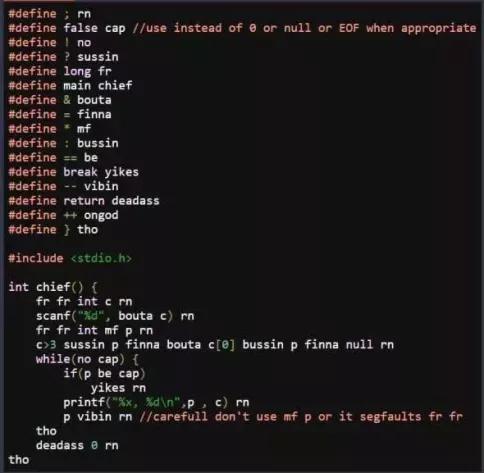
Example of the preprocessor used for evil
#define X YFind and replace all instances of “X” in the code with “Y”.
#if COND/#endifOnly include the following code up until
#endififCOND != 0#elifand#elseLike
else ifandelsebut for#if#defined(X)Evaluates to 1 if “X” has been defined previously with
#define X#ifdef Xand#ifndef XShort for
#if defined(X)and#if !defined(X), respectively#error "message"Forces the compiler to abort compilation and output the given message.
There are also function-like macros, variadic macros, and more, but you’ll quickly stray into evil-incarnate-territory with those ones! If you really want to know, refer to the official C macro documentation.
Macros are helpful for platform-specific behavior:
#if defined(WIN32) && !defined(UNIX)
    // Do windows stuff
#elif defined(UNIX) && !defined(WIN32)
    // Do linux stuff
#else
#error "Compiling for unknown platform!"
#endif
Macros are also helpful for removing debug code in production:
// Set DEBUG to 0 to disable debug messages
#define DEBUG 1
// Production code
#if DEBUG
    printf("Debug message!");
#endif
// More production code
Header Guards
What happens if we accidentally include the same header twice? Well, the contents will be pasted twice, causing the compiler to freak out. This might seem like a silly mistake to make, but consider that your header file might’ve been included in other header files, which you might import by mistake.
In Utilities.h:
void helpfulFunction();
In MyProgram.h:
#include "Utilities.h"

int add(int a, int b);
void printNumber(int n);
In MyProgram.c:
#include "Utilities.h"
#include "MyProgram.h" // Uh oh!

// More code
What the code looks like after includes are expanded:
void helpfulFunction();
void helpfulFunction(); // Uh oh!
int add(int a, int b);
void printNumber(int n);
// More code
To fix this, we use a clever trick called a “header guard”:
In Utilities.h:
#ifndef UTILITIES_H
#define UTILITIES_H

void helpfulFunction();

#endif
In MyProgram.h:
#ifndef MY_PROGRAM_H
#define MY_PROGRAM_H

#include "Utilities.h"

int add(int a, int b);
void printNumber(int n);

#endif
In MyProgram.c: [same as before]
What the code looks like after includes are expanded:
// Include Utilities.h
#ifndef UTILITIES_H
#define UTILITIES_H
void helpfulFunction();
#endif
// End Utilities.h
// Include MyProgram.h
#ifndef MY_PROGRAM_H
#define MY_PROGRAM_H
// Include Utilities.h within MyProgram.h
#ifndef UTILITIES_H // UTILITIES_H is already defined! Cut out this code!
//#define UTILITIES_H
//void helpfulFunction();
#endif
// End Utilities.h within MyProgram.h
int add(int a, int b);
void printNumber(int n);
#endif
// End MyProgram.h
// The rest of MyProgram.c
As you can see, the second time Utilities.h is included, its contents are
ignored by the preprocessor because of the first #define UTILITIES_H.
C++: C With Classes
Finally! We’ve left the realm of C and we are ready to enter the world of C++!
C++ was invented by Danish computer scientist Bjarne Stroustrup in 1979. It began as a transpiler called CFront that translated the new language to C, similar to how TypeScript transpiles to JavaScript today. As the language got more complex, an independent compiler was developed for C++.
Though most C code is also valid C++ code, C++ has continued to evolve over the years. Modern C++ looks quite different from its mother language. On MRDT, we don’t make use of most of the newer features, generally sticking to features original to C. This approach is often called “C with classes”. In fact, C++ was originally called “C with classes” by its creator in its early days.
The differences between C and C++ begin stacking up all the way back from our Hello World program:
#include <iostream>

int main() {
    std::cout << "Hello, World!" << std::endl;
    return 0;
}
Yeah… I don’t know that made Bjorne think that this was easier to read than
C’s printf(). If you want to use the old C libraries, they’re still here,
you just have to include the library with a c prepended to its name:
#include <cstdio>

int main() {
    std::printf("Hello, World!");
    return 0;
}
Notice that instead of printf() being globally available, we have to
access it through the std:: namespace.
Namespaces
One thing that immediately jumps out at you when reading C++ code is the
abundance of ::. This double colon usually denotes a namespace.
One major improvement C++ makes over C is namespaces. A namespace allows you to have multiple variables with the same name, so long as they belong to separate namespaces.
#include <iostream>
namespace A {
    int variable = 1;
    void function() {
        std::cout << variable << std::endl;
    }
}
namespace B {
    int variable = 2;
    void function() {
        std::cout << variable << std::endl;
    }
}

int main() {
    A::function();
    B::function();
    return 0;
}
>>> 1
>>> 2
Here, we would normally have a naming conflict. In C, you would have to rename
your variables and functions like A_variable and B_function().
One thing you may see in example code is using namespace. This dumps all of
a namespace’s members into the global namespace. Programmers often use this to
avoid typing std:: over and over, but in production codebases, this is
usually avoided to prevent namespace pollution (accidental name conflicts).
#include <iostream>

using namespace std;

int main() {
    // No std:: needed!
    cout << "Hello, World!" << endl;
}
Some more examples:
#include <iostream>
namespace A {
    int variable = 1;
    void function() {
        std::cout << variable << std::endl;
    }
}
namespace B {
    using namespace std; // Only effective in namespace B
    int variable = 2;
    void function() {
        cout << variable << endl;
    }
}

using A::function; // Pull in function() from namespace A
int main() {
    function(); // A::function()
    B::function();
    return 0;
}
Structs and Enums Again (C++)
Great news! Structs and enums no longer require the peculiar typedef pattern! You can simply define them and use them normally:
enum CarType {SEDAN, TRUCK, SUV};

struct Car {
    CarType type;
    float maxSpeed;
    int numberOfWheels;
};

Car myCar{SEDAN, 110.0f, 4};
C-style enums dump all their values into the parent namespace. In C++, you
can use enum class to prevent this:
// use enum class to prevent OTHER from conflicting
enum class CarType {SEDAN, TRUCK, SUV, OTHER};
enum class EngineType {V4, V8, OTHER};

struct Car {
    CarType type;
    EngineType engine;
    float maxSpeed;
    int numberOfWheels;
};
Car myCar{CarType::SEDAN, EngineType::OTHER, 110.0f, 4};
Classes
Object Oriented Programming (OOP) is a powerful idea that has shaped the way we’ve written code for decades. It began with old languages like Simula and Smalltalk, but was immortalized by C++. At the heart of this paradigm is the idea of a class. At it’s heart, a class is a way to couple data and functionality together.
Member Functions
In C, you can group data members together with a struct, then write functions that operate on those structs:
struct CarData {
    float speed;
    float position;
};

void driveCar(CarData *carPtr, float acceleration, float frameTime) {
    carPtr->speed += acceleration * frameTime;
    carPtr->position += carPtr->speed * frameTime;
}

struct CarData car1{0.0f, 10.0f}, car2{5.0f, -2.5f};
int main() {
    while (1) {
        driveCar(&car1, 4.3f, 0.01f);
        driveCar(&car1, 7.8f, 0.01f);
        std::cout << "Car 1: " << car1.position
                << ", Car 2: " << car2.position << std::endl;
    }
}
In C++, we can wrap the data and operation together by adding a member function to our struct:
struct Car {
    float speed;
    float position;
    void drive(float acceleration, float frameTime) {
        speed += acceleration * deltaTime;
        position += speed * frameTime;
    }
};

Car car1{0.0f, 10.0f}, car2{5.0f, -2.5f};
int main() {
    while (true) {
        car1.drive(4.3f, 0.01f);
        car2.drive(7.8f, 0.01f);
        std::cout << "Car 1: " << car1.position
                << ", Car 2: " << car2.position << std::endl;
    }
}
It’s a subtle change, but we’ve just fundamentally shifted our semantic idea of a car from a car that gets driven to a car that drives itself.
Visibility
The second big idea of OOP is encapsulation. Instead of making all member variables publicly accessible, we can only allow member variables to be read through member functions.
//struct Car {
class Car {
private:
    float speed = 0;
    float position = 0;
public:
    void drive(float acceleration, float frameTime) {...}
    float getSpeed() {
        return speed;
    }
    float getPosition() {
        return position;
    }
};
// We can no longer initialize speed and position since they're private
Car car1, car2;
int main() {
    while (true) {
        car1.drive(4.3f, 0.01f);
        car2.drive(7.8f, 0.01f);
        std::cout << "Car 1: " << car1.getPosition()
                << ", Car 2: " << car2.getPosition() << std::endl;
    }
}
The class keyword means nearly the same thing as struct. The only
difference is that by default, all members of a class are private, but
all members of a struct are public.
Constructors
But we still need to set the position and speed initially, even if we don’t
want our code accidentally changing them outside of drive(). We can create
a constructor:
//struct Car {
class Car {
private:
    float m_speed = 0;
    float m_position = 0;
public:
    Car(float speed, float position) {
        m_speed = speed;
        m_position = position;
    }
    void drive(float acceleration, float frameTime) {...}
    float getSpeed() {...}
    float getPosition() {...}
};
// Construct cars with initial speeds and positions
Car car1(0.0f, 10.0f), car2(5.0f, -2.5f);
int main() {
    while (true) {
        car1.drive(4.3f, 0.01f);
        car2.drive(7.8f, 0.01f);
        std::cout << "Car 1: " << car1.getPosition()
                << ", Car 2: " << car2.getPosition() << std::endl;
    }
}
But why in the world would you want to write all that extra boilerplate? In old C codebases, you had structs all over the place, and any part of the codebase could go in and modify them. This led to all sorts of bugs that were very hard to track. Encapsulation improves code security and maintainability.
Destructors
The opposite of a constructor, a destructor is a function to be called when an instance of a class gets deleted or goes out of scope.
class Car {
private:
    float m_speed = 0;
    float m_position = 0;
public:
    Car(float speed, float position) {
        m_speed = speed;
        m_position = position;
        std::cout << "Made car! Position: " << m_position << std::endl;
    }
    // Car destructor
    ~Car() {
        std::cout << "Car go boom! Position: " << m_position << std::endl;
    }
    void drive(float acceleration, float frameTime) {...}
    float getSpeed() {...}
    float getPosition() {...}
};

int main() {
    {
        Car car1(0.0f, 10.0f);
        {
            Car car2(5.0f, -2.5f);
        } // car2 goes out of scope
    } // car1 goes out of scope
    return 0;
}
>>> Made car! Position: 10.0
>>> Made car! Position: -2.5
>>> Car go boom! Position: -2.5
>>> Car go boom! Position: 10.0
Declaring a Class in the Header
In the prior examples, Car was defined entirely in the source file. Usually
you will declare your class in the header file and define its member functions
in the source.
In Car.h:
#ifndef CAR_H
#define CAR_H

class Car {
public:
    Car(float speed, float position);
    ~Car();
    void drive(float acceleration, float frameTime);
    float getSpeed();
    float getPosition();

private:
    float m_speed = 0;
    float m_position = 0;
};

#endif
Whether to put the private section at the top or at the bottom is hotly
debated among programmers. The benefit of keeping it on the bottom is that
users of your class only care about what they can actually use, so when they
read your header file that information should come first.
In Car.cpp:
#include "Car.h"

Car::Car(float speed, float position) {
    m_speed = speed;
    m_position = position;
    std::cout << "Made car! Position: " << m_position << std::endl;
}
// Car destructor
Car::~Car() {
    std::cout << "Car go boom! Position: " << m_position << std::endl;
}
void Car::drive(float acceleration, float frameTime) {...}
float Car::getSpeed() {...}
float Car::getPosition() {...}
Note how the class behaves like a namespace, requiring :: to specify that
you intend to define Car::drive() rather than a new independent drive()
function.
Inheritance
The final pillar of OOP is polymorphism. This allows you to write multiple different classes that share functions in common such that you can substitute them out for each other.
C++ inheritance is a complicated mess, so I won’t try to summarize it here. Check out this article for a good explanation.
Many of our libraries use polymorphism to remain modular and extensible. For
example, a RoveJoint is a class that drives a motor to a position based on
encoder and limit switch feedback. The constructor for a RoveJoint takes a
pointer to a RoveMotor. You can’t make a RoveMotor, though. You can only
make one of several motor types like RoveVESC or RoveVNH.
Each of these motor classes drives a different kind of motor, but they all
inherit the drive() function from their base class RoveMotor. And
implement it in their own way.
So when RoveJoint takes its RoveMotor* and calls m_roveMotor->drive(),
whatever RoveMotor you gave it will call its own drive().
// VESCMotor.drive() drives a VESC through UART
RoveVESC VESCMotor(&Serial1);
// DCMotor.drive() drives a brushed DC motor with a VNH chip
RoveVNH DCMotor(PWM, IN_A, IN_B, CS);

// You can create a RoveJoint with either type, because both RoveVESC* and
// RoveVNH* inherit from RoveMotor*
RoveJoint Axis1(&VESCMotor);
RoveJoint Axis2(&DCMotor);

// [Configure Axis1 and Axis2 here]

// Use them both in the same way
// The RoveJoint is calling drive() internally, which both motors implement
// in a unique way
Axis1.setAngle(90);
Axis2.setAngle(60);
New and Delete
In C, we allocated dynamic memory with malloc() and deallocated it with
free(). In C++, we have the new[] and delete[] operators.
int main() {
    // int *myIntArray = malloc(4 * sizeof(int));
    int *myIntArray = new int[4]; // No extra size calculation needed!

    // Memory is uninitialized
    for (int i = 0; i < 4; i++) {
        myIntArray[i] = i;
    }
    // myIntArray is now [0, 1, 2, 3]

    // No memory leaks allowed!
    delete[] myIntArray;
}
We can also dynamically allocate individual classes. Pointers to objects are
useful for when your object is optional. You don’t need the [] on the new
and delete operators in this case:
// Initialize to null
Car *maybeCar = nullptr;

int main() {
    if (!maybeCar) {
        // Allocate and construct a new Car
        maybeCar = new Car(0.0f, 10.0f);
    }

    maybeCar->drive(4.3f, 0.01f);

    // No memory leaks allowed!
    delete maybeCar;
    // Reset to null
    maybeCar = nullptr;
}
Note that deleting a nullptr is not an error, it just does nothing.
Memory Management Pitfalls
Manual memory management in C and C++ introduces a whole host of nasty bugs. Here are a few that you’ll likely run into:
- Null Pointer Dereference
Attempting to access a
nullptr. This happens when you’ve forgotten to allocate a pointer and its value has been set to null.
int *iptr = nullptr;
int i = *iptr; // Whoops!
iptr = new int[4];
- Segmentation Fault
Attempting to access memory outside of that which you’ve allocated. Usually this means you’ve gone past the end of a buffer or you haven’t allocated a pointer and it’s some random value.
int *iptr; // Random, unititialized value
int i = *iptr; // Probably will sefgault

iptr = new int[4];
i = iptr[4]; // Out of bounds!
// Might sefgault if the memory outside our buffer is not also owned by our program
- Use After Free
Attempting to use memory after you’ve called
deleteorfree()on it. This one is particularily nasty because the chances are that the old memory will still be intact, since it isn’t overwritten until it is allocated elsewhere.
int *iptr = new int[4];
delete[] iptr;
int i = iptr[0]; // Whoops!
- Double Free
Attempting to free memory after you’ve already deallocated it.
int *iptr = new int[4];
delete[] iptr;
delete[] iptr; // Whoops!
- Memory Leak
Forgetting to free memory after you’ve allocated it. This mistake is almost inevitable, and you’re bound to have at least a small, hard to track leak. This is usually why some applications on your computer get slower and use more memory when you leave them open for a few days.
int *iptr = new int[4];
*iptr = new int[4]; // Oops! Overwrote the old pointer. Now it will never be deleted!
delete[] iptr;
In modern C++ (like in the Autonomy codebase) you will normally use smart pointers which are much safer. But for our purposes, raw pointers are fine.
Reference Types
References are basically non-nullable pointers. They are denoted by a & on
the variable name. References are generally safer than pointers because they
cannot be null and they cannot be reseated (get pointed at something else).
This makes errors like null pointer dereferences less likely.
#include <iostream>
int main() {
    int i = 42;
    int &ref = i; // No "&" needed to assign the reference!
    i += 1; // Modify i which modifies ref
    std::cout << ref << std::endl; // No "*" needed to access!
    ref += 1; // Modify ref which modifies i
    std::cout << i << std::endl; // No "*" needed to access!

    int &ref2; // ERROR: you MUST assign a reference where you declare it!
}
>>> 43
>>> 44
Note that references have the same usage and assignment semantics as regular values.
Recall how in C, we had to pass a pointer to a struct if we didn’t want to copy it, and a const struct if we also didn’t want to modify it:
#include <stdio.h>

enum CarType {SEDAN, TRUCK, SUV};

struct Car {
    enum CarType type;
    float maxSpeed;
    int numberOfWheels;
};

// Access, but do not modify car
void printMaxSpeed(const struct Car *car) {
    // Dereference car and access its maxSpeed
    printf("%f", car->maxSpeed);
}

// Access and modify car
void doubleMaxSpeed(struct Car *car) {
    // Dereference car and modify its maxSpeed
    car->maxSpeed *= 2;
}

int main() {
    struct Car myCar = {TRUCK, 107.5f, 4};
    doubleMaxSpeed(&myCar);
    printMaxSpeed(&myCar);
    return 0;
}
>>> 215.0
C++ references make things nicer since references have the same semantics as value types:
#include <iostream>

enum class CarType {SEDAN, TRUCK, SUV};

struct Car {
    CarType type;
    float maxSpeed;
    int numberOfWheels;
};

// Access, but do not modify car
void printMaxSpeed(const Car &car) {
    std::cout << car.maxSpeed << std::endl;
}

// Access and modify car
void doubleMaxSpeed(Car &car) {
    car.maxSpeed *= 2; // "." like a value instead of "->" like a pointer
}

int main() {
    Car myCar{CarType::TRUCK, 107.5f, 4};
    doubleMaxSpeed(myCar); // No "&" required! Passed by reference!
    printMaxSpeed(myCar);
    return 0;
}
>>> 215.0
This also means you can switch printMaxSpeed() between passing by value and
passing by reference without changing all the code at every callsite. In C, if
you changed a function to take a pointer-to-value instead of a value, you would
have to hunt down all occurrences of the function and insert & everwhere.
Here’s another example of a simple function that swaps two integers:
#include <iostream>

/* OLD way with stinky pointers:
void swap(int *a, int *b) {
    int temp = *a;
    *a = *b;
    *b = temp;
}
*/

// NEW way with referenes!
void swap(int &a, int &b) {
    int temp = a;
    a = b;
    b = temp;
}

int main() {
    int i1 = 3, i2 = 4;
    std::cout << i1 << ", " << i2 << std::endl;

    // swap(&i1, &i2); // OLD way with stinky pointers
    swap(i1, i2);

    std::cout << i1 << ", " << i2 << std::endl;
    return 0;
}
>>> 3, 4
>>> 4, 3
When Should I Use Values, Pointers, Or References?
Pass by value if your argument:
Is trivially copyable, meaning it’s like less than 8 bytes. Just take this to mean
floats,ints,bools, and any number-y type. This includesenums since they’re just a single number.Does not need to change the original variable you pass into the function.
Pass by reference if your argument:
Needs to change the original variable you pass into the function.
Must always have a valid value (can’t be null)
Pass by const reference if your argument:
Is not trivially copyable (most
structs andclasses).Should not change the original variable you pass into the function.
Must always have a valid value (can’t be null)
Pass by pointer if your argument:
Needs to change the original variable you pass into the function.
Is optional (might be null).
Pass by const pointer if your argument:
Is not trivially copyable
Should not change the original variable you pass into the function.
Is optional (might be null).
Reference Invalidation
While references are never allowed to be assigned null, sometimes the object they point to can stop existing. This can happen if you return a reference to a local stack allocated variable.
#include <iostream>

int &refMaker() {
    int i = 42;
    return i; // i is stack allocated: i is deleted after the function ends
}

int main() {
    int &i = refMaker(); // refMaker produces an invalid reference!
    std::cout << i << std::endl; // ERROR
    return 0;
}
The only time you can return a reference from a function is if you know for sure that what it points to will still exist after the function ends. This could include member variables of a class or global variables.
// myCar will probably exist for a long time, so returning by reference
// will avoid an unnecessary copy without allowing modification of the car
const Car &myCar = parkingLot.getCarByOwner("Me");
myCar.printMaxSpeed();
Strings (C++)
C++ ammends the sins of C’s null terminated strings with std::string.
C++ string is a prefixed string that knows its own length.
#include <string>
#include <iostream>

int main() {
    std::string prefixedString = "abc";
    std::cout << prefixedString << ", " << prefixedString.size() << std::endl;
    // You can still convert it to a null terminated string
    const char *nullTerminated = prefixedString.c_str();
}
>>> abc, 3
A C++ string allocates its memory with the new operator and calls
delete in its destructor. This means that if you pass it by value, it will
copy itself, creating a new string that allocates more memory on the heap. This
can cause performance issues, so should be avoided when necessary. You can do
this simply with a const reference:
#include <string>
#include <iostream>

void printBackwards(const std::string &string) {
    // Iterate backwards over string characters
    for (int i = string.size() - 1; i >= 0; i--) {
        std::cout << string[i];
    }
    std::cout << std::endl;
}

int main() {
    std::string string = "abc";
    // No extra string copy made since printBackwards() takes a const ref
    printBackwards(string);
}
>>> cba